
Actions Pictures: Dynamic AAC Symbols
Chad Sherman · on 24 July 2026 · 12 min read · Last reviewed 24 July 2026
Actions pictures are visual symbols used in assistive speech software to represent dynamic activities or commands, helping non-verbal individuals communicate specific actions through augmented and alternative communication (AAC).
- Actions pictures are part of the **Picture Communication Symbols (PCS)** system, a standardized set of over 15,000 symbols used worldwide in AAC.
- They are designed to be culturally neutral and universally understood, according to Symbol in Communication: Visual Aids Guide.
- Actions pictures can be static or animated, depending on the AAC software.
- The use of actions pictures can significantly improve communication for individuals with conditions like autism, cerebral palsy, or aphasia.
How do actions pictures work in assistive speech software?
Actions pictures work by linking a visual symbol to a specific word or phrase in the AAC software. When a user selects the symbol, the software outputs the corresponding word or phrase as speech. This allows non-verbal individuals to express actions, needs, or desires.
In plain terms, actions pictures are like buttons on a digital communication board, each representing a different action or command. The software speaks the word when the button is pressed, providing a voice for the user.
- Actions pictures are typically organized into categories based on communicative functions, such as requests, comments, or social interactions.
- They can be customized to suit the user's specific needs and vocabulary, according to Core Board Basics: Essential Symbols.
- Actions pictures are often used alongside other symbols, such as nouns, adjectives, and verbs, to create complete sentences.
- The size and color of actions pictures can be adjusted in most AAC software to improve visibility and accessibility.
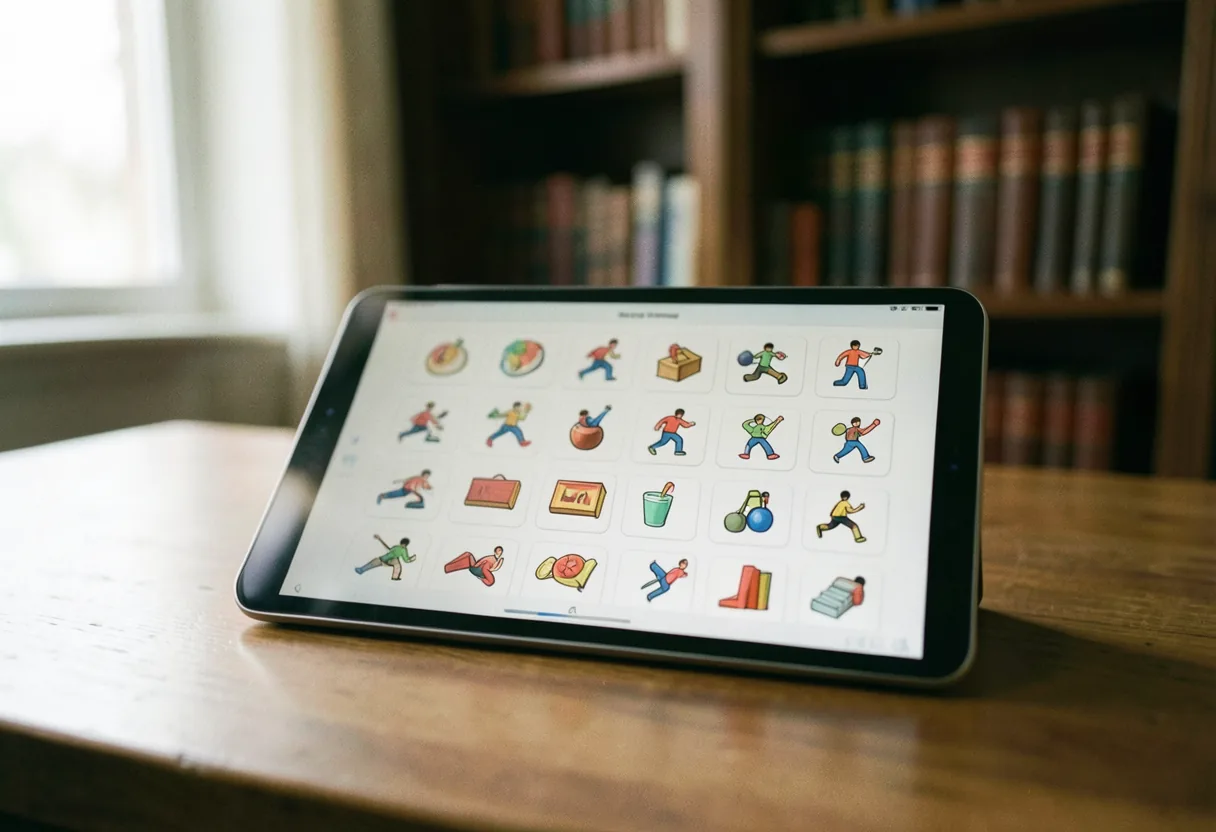
What are some popular assistive speech software options that use actions pictures?
Several assistive speech software options incorporate actions pictures to enhance communication. Some of the most popular include:
- **Proloquo2Go**: This iPad app employs a comprehensive symbol set, featuring action pictures, to aid communication for non-verbal individuals. It provides customizable vocabulary and natural-sounding voices.
- **Grid by Smartbox**: This flexible software allows users to create personalized communication grids using actions pictures and other symbols. It is compatible with various devices and platforms, including Windows and iOS.
- **TouchChat by Saltillo**: This app provides a comprehensive symbol set, including actions pictures, to support communication for individuals with speech impairments. It offers pre-programmed vocabulary pages and the ability to customize content.
- **Speech Assistant AAC**: This free app allows users to create personalized communication boards using actions pictures and other symbols. It offers text-to-speech functionality and customizable vocabulary.
How much does assistive speech software with actions pictures cost?
The cost of assistive speech software with actions pictures can vary significantly depending on the features, customization options, and platform. Here's a breakdown of some popular options:
| Software | Platform | Cost |
|---|---|---|
| Proloquo2Go | iOS | $249.99 (one-time purchase) |
| Grid by Smartbox | Windows, iOS | Varies (custom pricing based on needs) |
| TouchChat by Saltillo | iOS, Android | $199.99 (one-time purchase) |
| Speech Assistant AAC | Android, iOS | Free (with in-app purchases for additional features) |
How to get an AAC device for free?
To get an AAC device for free, you can explore several options, including insurance coverage, government programs, and nonprofit organizations. Here are some steps to follow:
- **Consult with a speech-language pathologist (SLP)**: An SLP can assess your needs and recommend appropriate AAC devices.
- **Check your insurance coverage**: Some insurance plans cover AAC devices as durable medical equipment. Contact your insurance provider to inquire about coverage.
- **Explore government programs**: Programs like Medicaid and the Individuals with Disabilities Education Act (IDEA) may provide funding for AAC devices for eligible individuals.
- **Contact nonprofit organizations**: Organizations like the United States Society of Augmentative and Alternative Communication (USSAAC) and the Assistive Technology Industry Association (ATIA) may offer resources and funding opportunities for AAC devices.
- **Look for free or low-cost apps**: Some AAC apps, like Speech Assistant AAC, offer free versions with basic features. These apps can be a cost-effective starting point for communication.
What is the most popular AAC app?
Proloquo2Go, the most popular AAC app, is widely used by individuals with speech impairments and their caregivers. Proloquo2Go offers a comprehensive symbol set, including actions pictures, and provides natural-sounding voices. It is available for iOS devices and offers customizable vocabulary and communication boards.
Who would benefit from using actions pictures in assistive speech software?
Pictures depicting actions can benefit a wide range of individuals with speech impairments, including those with.
- **Autism Spectrum Disorder (ASD)**: Many individuals with ASD use AAC to communicate their needs, preferences, and emotions. Actions pictures can help them express specific actions or desires.
- **Cerebral Palsy**: Individuals with cerebral palsy may have difficulty with speech due to muscle weakness or coordination problems. Actions pictures can provide a visual way to communicate actions and commands.
- **Aphasia**: Aphasia is a condition that affects the ability to communicate due to brain damage. Actions pictures can help individuals with aphasia express themselves by linking visual symbols to words or phrases.
- **Developmental Disabilities**: Children and adults with developmental disabilities, such as Down syndrome or intellectual disabilities, can benefit from using actions pictures to communicate their needs and desires.
What are the benefits of using actions pictures in AAC?
Using actions pictures in AAC offers several benefits, including:
- **Visual Support**: Actions pictures provide a visual representation of actions or commands, making it easier for non-verbal individuals to understand and use.
- **Customization**: Actions pictures can be customized to suit the user's specific needs and vocabulary, allowing for personalized communication.
- **Consistency**: Using a standardized set of actions pictures, like the Picture Communication Symbols (PCS) system, ensures consistency and familiarity across different AAC devices and platforms.
- **Engagement**: Actions pictures can make communication more engaging and interactive, encouraging users to participate in conversations and express themselves.
How to choose the right AAC software with actions pictures?
To choose the right AAC software with actions pictures, consider the following factors:
- **User Needs**: Assess the user's communication needs, including vocabulary size, customization requirements, and access methods.
- **Platform Compatibility**: Ensure the software is compatible with the user's device or platform, such as iOS, Android, or Windows.
- **Symbol Set**: Choose software that offers a comprehensive symbol set, including actions pictures, to support a wide range of communication functions.
- **Customization Options**: Look for software that allows customization of vocabulary, communication boards, and symbol size to suit the user's preferences.
- **Voice Quality**: Consider the quality and naturalness of the software's text-to-speech voices, as this can impact the user's communication experience.
- **Cost**: Evaluate the cost of the software, including any ongoing subscription fees or in-app purchases, to ensure it fits within your budget.
What are some tips for using actions pictures effectively?
To use actions pictures effectively, follow these tips:
- **Introduce Symbols Gradually**: Introduce actions pictures one at a time, allowing the user to become familiar with each symbol before adding more.
- **Use Contextual Cues**: Pair actions pictures with contextual cues, such as objects or real-life situations, to help the user understand their meaning.
- **Encourage Practice**: Encourage the user to practice using actions pictures in various contexts, such as requesting items, commenting on their environment, or engaging in social interactions.
- **Provide Positive Feedback**: Offer positive feedback and reinforcement when the user correctly uses actions pictures to communicate.
- **Review and Update**: Regularly review and update the user's vocabulary and communication boards to ensure they meet their changing needs and preferences.
How to create personalized actions pictures for AAC?
To create personalized actions pictures for AAC, follow these steps:
- **Choose a Symbol Creation Tool**: Use a symbol creation tool, such as Boardmaker or Symbolab, to design custom actions pictures.
- **Select the Base Symbol**: Start with a base symbol that closely resembles the action you want to represent.
- **Customize the Symbol**: Modify the base symbol to better represent the specific action or command. This may involve changing the color, size, or orientation of the symbol.
- **Test the Symbol**: Test the custom actions picture with the user to ensure they understand its meaning and can use it effectively.
- **Integrate the Symbol**: Add the custom actions picture to the user's AAC software or communication board, ensuring it is easily accessible and visible.
What are some alternatives to actions pictures in AAC?
Alternatively, other methods and symbols can be used alongside actions pictures in AAC to enhance communication. Some popular options include:
- **Pictograms**: Pictograms are simple, stylized drawings that represent objects, actions, or concepts. They are often used in combination with actions pictures to create comprehensive communication boards.
- **Photo-Based Symbols**: Photo-based symbols use real-life photographs to represent objects, actions, or concepts. They can be particularly effective for individuals who struggle with abstract symbols.
- **Text-Based Communication**: Text-based communication involves using written words or phrases to express thoughts and ideas. This method can be combined with actions pictures to support literacy development.
- **Sign Language**: Sign language uses manual gestures and facial expressions to communicate. It can be used alongside actions pictures to provide a multisensory approach to communication.
How to integrate actions pictures into an AAC curriculum?
To integrate actions pictures into an AAC curriculum, follow these steps:
- **Assess Communication Needs**: Evaluate the communication needs of the students or individuals involved in the curriculum.
- **Select Appropriate Symbols**: Choose actions pictures and other symbols that align with the curriculum's goals and objectives.
- **Create Communication Boards**: Design communication boards that incorporate actions pictures and other symbols, organizing them by communicative function or topic.
- **Introduce Symbols Gradually**: Introduce actions pictures and other symbols gradually, allowing students to become familiar with each symbol before adding more.
- **Model and Practice**: Model the use of actions pictures in various contexts and encourage students to practice using them in their communication.
- **Review and Adjust**: Regularly review and adjust the curriculum to ensure it meets the changing needs and preferences of the students.
Why use actions pictures in AAC for non-verbal adults?
Pictures depicting actions are particularly beneficial for non-verbal adults using AAC for several reasons.
- **Independence**: Actions pictures empower non-verbal adults to communicate their needs, desires, and thoughts independently, fostering a sense of autonomy and self-determination.
- **Social Engagement**: Actions pictures facilitate social interactions by providing a visual means of communication, enabling non-verbal adults to engage with others more effectively.
- **Cognitive Support**: Actions pictures support cognitive functioning by providing visual cues that help non-verbal adults process and organize information.
- **Accessibility**: Actions pictures can be easily customized and adapted to suit the unique needs and preferences of non-verbal adults, ensuring accessibility and inclusivity.
What are the key features to look for in assistive speech software with actions pictures?
When choosing assistive speech software with actions pictures, look for the following key features:
- **Comprehensive Symbol Set**: Ensure the software offers a comprehensive symbol set, including actions pictures, to support a wide range of communication functions.
- **Customization Options**: Look for software that allows customization of vocabulary, communication boards, and symbol size to suit the user's preferences.
- **Natural-Sounding Voices**: Consider the quality and naturalness of the software's text-to-speech voices, as this can impact the user's communication experience.
- **Multi-Modal Output**: Choose software that supports multi-modal output, such as speech, text, and visual cues, to enhance communication and comprehension.
- **Accessibility Features**: Ensure the software offers accessibility features, such as switch access, eye-tracking, or gesture control, to accommodate the user's unique needs.
- **Platform Compatibility**: Verify that the software is compatible with the user's device or platform, such as iOS, Android, or Windows.
- **Portability**: Consider software that offers portable options, such as apps or cloud-based solutions, allowing the user to communicate on the go.
How to evaluate the effectiveness of actions pictures in AAC?
To evaluate the effectiveness of actions pictures in AAC, consider the following factors:
- **Communication Outcomes**: Assess the user's communication outcomes, such as the frequency and quality of their communication attempts, to determine the impact of actions pictures.
- **User Satisfaction**: Gather feedback from the user and their caregivers to evaluate their satisfaction with actions pictures and their overall communication experience.
- **Symbol Comprehension**: Test the user's comprehension of actions pictures to ensure they understand their meaning and can use them effectively.
- **Symbol Generalization**: Evaluate the user's ability to generalize actions pictures across different contexts and situations, demonstrating their flexibility and adaptability.
- **Symbol Retention**: Monitor the user's retention of actions pictures over time to assess their long-term effectiveness and relevance.
What are some common challenges in using actions pictures in AAC?
Some common challenges in using actions pictures in AAC include:
- **Symbol Ambiguity**: Actions pictures may be ambiguous or difficult to understand, particularly for users with cognitive impairments or limited exposure to visual symbols.
- **Symbol Availability**: The availability of actions pictures may be limited, particularly for less common or culturally specific actions or commands.
- **Symbol Customization**: Customizing actions pictures to suit the user's unique needs and preferences can be time-consuming and require specialized skills or tools.
- **Symbol Organization**: Organizing actions pictures on communication boards or in AAC software can be challenging, particularly for users with extensive vocabularies or complex communication needs.
- **Symbol Maintenance**: Maintaining and updating actions pictures over time can be demanding, requiring regular reviews and adjustments to ensure their continued relevance and effectiveness.
How to address the challenges of using actions pictures in AAC?
To address the challenges of using actions pictures in AAC, consider the following strategies:
- **Provide Contextual Support**: Pair actions pictures with contextual cues, such as objects or real-life situations, to enhance their clarity and comprehension.
- **Collaborate with Professionals**: Work with speech-language pathologists, teachers, or other professionals to design and implement effective AAC systems that incorporate actions pictures.
- **Leverage Technology**: Utilize symbol creation tools, apps, or software that offer customization options and comprehensive symbol sets to address the unique needs of the user.
- **Encourage Practice**: Foster a supportive and encouraging environment that promotes the practice and use of actions pictures in various contexts and situations.
- **Regularly Review and Update**: Conduct regular reviews and updates of the user's AAC system to ensure the continued relevance, effectiveness, and accessibility of actions pictures.
Actions pictures are a powerful tool in assistive speech software, enabling non-verbal individuals to communicate specific actions and commands effectively. By understanding their benefits, features, and challenges, you can make informed decisions about incorporating actions pictures into AAC systems and supporting users in their communication journey.
Frequently asked questions
What are Actions Pictures in AAC?
Actions Pictures are dynamic symbols used in Augmentative and Alternative Communication (AAC). They depict actions, like 'eat' or 'drink,' using sequential images to show movement. This helps users express themselves more clearly than static symbols. For example, a picture of a hand reaching for a glass followed by drinking shows the complete action.
How do Actions Pictures improve communication?
Actions Pictures enhance communication by providing context and clarity. For instance, a static symbol for 'brush teeth' might be confusing. Actions Pictures show the sequence: picking up a toothbrush, applying toothpaste, and brushing. This visual storytelling helps users and listeners understand the intended message more accurately.
Who benefits from using Actions Pictures in AAC?
Actions Pictures benefit individuals with complex communication needs, especially those who struggle with abstract symbols. They are particularly useful for children learning to communicate and adults with aphasia or cognitive disabilities. For example, a child can use Actions Pictures to request a snack by showing the sequence of opening a bag and eating.
Can Actions Pictures be customized for individual users?
Yes, Actions Pictures can be customized. AAC systems often allow users to create personalized sequences. For example, if a user frequently asks for help opening a jar, their caregiver can design a custom sequence showing the action. This personalization makes the symbols more relevant and effective for the user's specific needs.